
Bucketing Algorithm
How the SDK deterministically assigns visitors to variations using MurmurHash3
In Data Management, we learned how the DataManager acts as the central librarian, storing project data and coordinating the process of deciding which variation a visitor sees. When a visitor qualifies for an experiment (rules pass) and hasn't been assigned a variation before, the DataManager asks a specialist to make the final assignment based on traffic percentages.
Let's meet that specialist: the BucketingManager.
The Problem: Fair and Consistent Sorting
Imagine our A/B test for the website headline:
- Variation A: "The Best Cloud Service" (shown to 50% of visitors)
- Variation B: "Lightning Fast Cloud Hosting" (shown to 50% of visitors)
When a new visitor, let's call her 'visitor456', arrives on the homepage, how does the SDK decide exactly which headline she sees? And critically, how does it make sure that:
- Fairness: Over time, roughly 50% of visitors see Variation A and 50% see Variation B, matching the percentages we set.
- Consistency: If 'visitor456' comes back tomorrow, she sees the same headline variation she saw today? We don't want her experience changing randomly!
We need a mechanism that can reliably and consistently sort visitors into different variations according to the specified traffic split.
What is BucketingManager? The Sorting Hat
BucketingManager? The Sorting HatThink of the BucketingManager as the Sorting Hat from Harry Potter, but for your website visitors and experiments.
Just like the Sorting Hat takes a student and decides which house they belong to, the BucketingManager:
- Receives the Visitor: It gets the unique
visitorId(like 'visitor456'). - Knows the "Houses" (Variations): It gets the list of variations for an experiment and their traffic allocation percentages (e.g., Variation A: 50%, Variation B: 50%).
- Performs "Magic" (Hashing): It performs a mathematical calculation (a hash function) using the visitor's ID and some details about the experiment (like a unique seed number). This calculation always produces the same result for the same input.
- Assigns the House (Variation): Based on the result of the calculation and the traffic percentages, it deterministically places the visitor into one specific variation's "bucket".
The key here is determinism. Because the hashing calculation is consistent, the same visitor ID will always land in the same bucket (variation) for a given experiment, ensuring they see the same experience across different visits or sessions.
Cross-SDK determinism: All Convert Fullstack SDKs use the same hashing algorithm (MurmurHash3) with the same seed and scaling logic. A visitor bucketed into Variation B by the JavaScript SDK will also be bucketed into Variation B by the PHP, Android, Ruby, iOS, or Python SDK for the same experience.
How it's Used (Internally)
Like many managers, you will almost never call the BucketingManager directly in your code. It works entirely behind the scenes.
Who uses it? The DataManager!
The getBucketing flow:
- DataManager checks if a decision is already stored for the visitor.
- If not, it checks if the visitor meets the targeting rules using the RuleManager.
- If rules pass, the DataManager calls the
BucketingManager. It passes the visitor's ID and the variation traffic splits to theBucketingManager'sgetBucketForVisitormethod. - The
BucketingManagercalculates and returns the chosen variation ID. - The DataManager stores this decision and returns the variation details.
So, BucketingManager is the specialized calculator that DataManager relies on for the core step of assigning visitors to variations based on percentages.
Under the Hood: How the Sorting Works
How does the "Sorting Hat" actually perform its deterministic assignment? It's a two-step process:
Step 1: Calculate a Consistent Number for the Visitor
- The SDK needs a number between 0 and a maximum value (say, 9999, representing 100.00% of traffic) that is unique to the visitor within the context of this experiment but always the same for that visitor.
- It achieves this using a hashing function — specifically MurmurHash3, the same algorithm used by all Convert SDKs to guarantee cross-SDK parity.
- Input: The visitor's ID (e.g., 'visitor456') and a unique seed value (often related to the experiment ID or a default seed).
- Process: The hash function scrambles the input bits in a complex but repeatable way. Think of it like a fancy blender that always produces the exact same smoothie texture if you put in the exact same ingredients.
- Output: A large number (the hash value).
- Scaling: This large hash number is then scaled down mathematically to fit within our desired traffic range (0–9999).
- Result: A number, let's say 'visitor456' consistently hashes to 7352 for our headline experiment.
Step 2: Map the Number to a Variation Bucket
- The SDK knows the traffic allocation: Variation A gets 50%, Variation B gets 50%.
- It imagines the total traffic range (0–9999) being divided according to these percentages:
- Variation A: Range 0 to 4999 (5000 points = 50%)
- Variation B: Range 5000 to 9999 (5000 points = 50%)
- It checks where the visitor's calculated number (7352) falls.
- Since 7352 is within the range 5000–9999, 'visitor456' is assigned to Variation B.
- If another visitor, 'user789', consistently hashes to 1234, they would fall into the 0–4999 range and be assigned to Variation A.
This ensures both fairness (the ranges match the percentages) and consistency (the visitor's hash number doesn't change).
Here's a simple diagram showing the interaction when DataManager needs to bucket a visitor:
sequenceDiagram
    participant DM as DataManager
    participant BM as BucketingManager

    Note over DM, BM: Visitor 'visitor456' needs bucketing for 'headline-test' (50/50 split)
    DM->>+BM: getBucketForVisitor(buckets={'varA': 50, 'varB': 50}, visitorId='visitor456', options={seed: 123, experienceId: 'exp1'})
    BM->>BM: Calculate hash('exp1' + 'visitor456', seed=123) -> scaledValue = 7352
    BM->>BM: Check ranges: 0-4999 (varA), 5000-9999 (varB)
    BM->>BM: 7352 falls into varB range.
    BM-->>-DM: Return { variationId: 'varB', bucketingAllocation: 7352 }
Implementation Details
The bucketing algorithm follows this pseudocode across all SDKs:
Constants:
  DEFAULT_HASH_SEED = 9999
  DEFAULT_MAX_TRAFFIC = 10000   // Represents 100.00%
  DEFAULT_MAX_HASH = 4294967296 // Max output of MurmurHash3 (2^32)

function getValueVisitorBased(visitorId, experienceId, seed):
    hashInput = experienceId + visitorId
    hash = murmurHash3(hashInput, seed)
    scaledValue = floor((hash / DEFAULT_MAX_HASH) * DEFAULT_MAX_TRAFFIC)
    return scaledValue  // e.g., 7352

function selectBucket(buckets, value):
    currentEndOfRange = 0
    for each (variationId, percentage) in buckets:
        currentEndOfRange += percentage * 100
        if value < currentEndOfRange:
            return variationId
    return null

function getBucketForVisitor(buckets, visitorId, experienceId, seed):
    value = getValueVisitorBased(visitorId, experienceId, seed)
    variationId = selectBucket(buckets, value)
    if variationId:
        return { variationId, bucketingAllocation: value }
    return null
Key implementation notes:
- The
experienceIdis concatenated withvisitorIdbefore hashing, ensuring the same visitor gets different hash values for different experiments (they might be in Variation A for one experiment and Variation B for another). - The
seedprovides an additional randomization factor. If not configured, the default seed (9999) is used. - Traffic allocation percentages in the config are 0–100 (representing XX.XX%). They're multiplied by 100 to map to the 0–10000 range.
Safe Traffic Ramping: The Anchored Layout
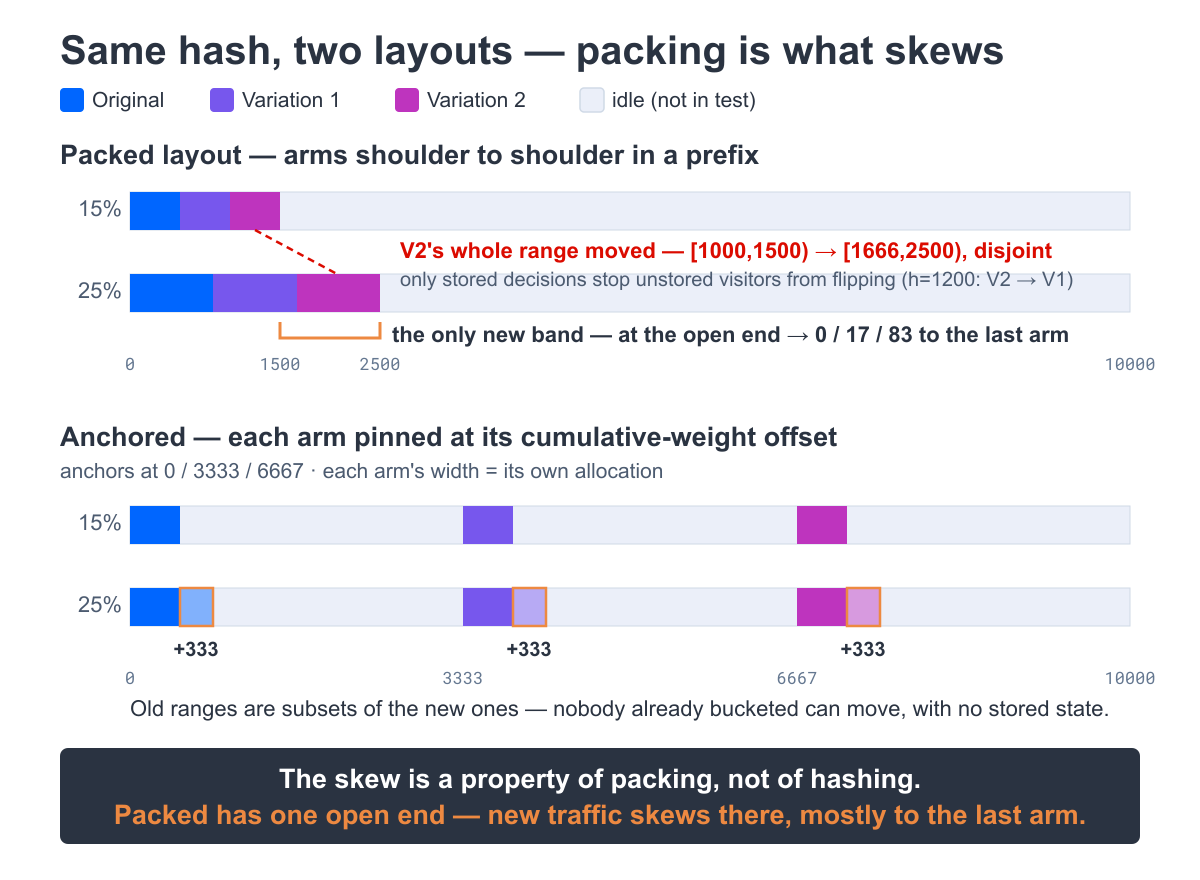
The walk above lays each variation's range end to end inside the allocated prefix — the "packed" layout. It is fair and deterministic, but it has one sharp edge: if you raise total traffic while an experiment is live, every arm's range shifts, and the newly opened traffic falls disproportionately at the open end of the prefix — mostly to the last variation (0 / 17 / 83 in the figure below). The result is a lopsided split of the new traffic (and, without a stored decision, some already-seen visitors could even flip arms).
Convert removes that edge for new experiences with an anchored layout. Instead of packing the arms together, it pins each variation at its cumulative-weight anchor across the full 0–10000 space and gives it a width equal to its allocation:
totalWeight = sum of allocation over all variations
if totalWeight == 0: return null      // nothing to bucket into
cumulativeWeight = 0
for each variation, in config order:
    anchor = (cumulativeWeight / totalWeight) * 10000
    width  = active ? allocation * 100 : 0      // stopped arms keep their anchor, get zero width
    if anchor <= value < anchor + width:
        return variationId
    cumulativeWeight += allocation
return null   // visitor is not bucketed
Because every arm grows at its own edge, raising traffic widens each range in place instead of shoving the others aside:
What this means for you:
- Raising total traffic mid-experiment is safe with no stored state. No visitor who is already bucketed is reshuffled, and newly admitted visitors split across the variations in proportion to their weights — no single arm absorbs all of the new traffic — because each arm's smaller range is a subset of its larger one.
- Lowering total traffic never reshuffles a visitor to a different arm either, but visitors whose hash now falls outside the shrunk ranges drop out of the experiment. If you need those visitors to stay bucketed, keep their decisions in a persistent DataStore.
- Don't change the split between variations (their individual weights) mid-experiment. Re-weighting reshuffles visitors in any layout — anchored included. The platform won't stop you, so treat it as a rule: ramp the total traffic, not the mix.
- Cross-SDK determinism is preserved. The anchored layout uses the same MurmurHash3, the same seed, and the same scaling as before, so a visitor lands in the same variation across the JavaScript, PHP, Python, Ruby, Android, and iOS SDKs.
Which layout applies:
New experiences use the anchored layout automatically. Experiences created earlier keep the packed layout, bit-for-bit — no visitor in an already-running experiment moves.
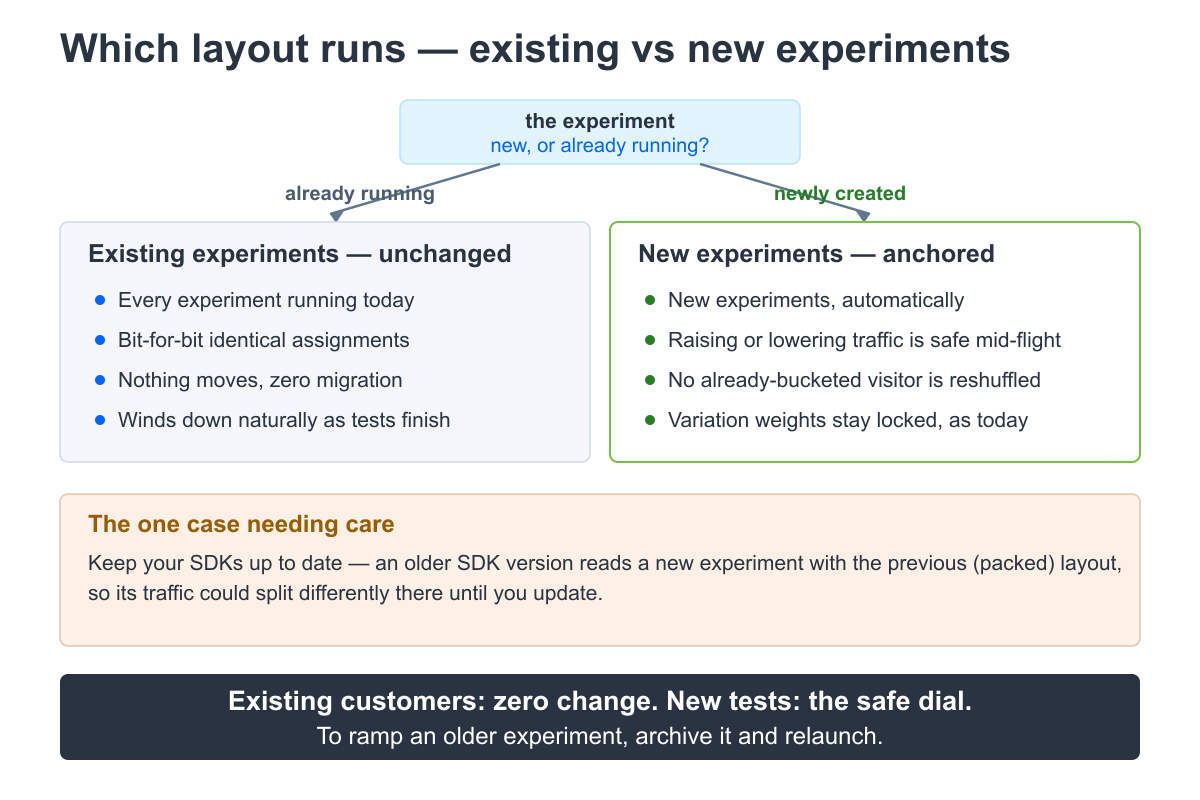
The SDK selects the layout per experience from the bucketing-contract version carried in the served config. This is an internal mechanism — you never set it, and it is unrelated to the version of the SDK package you install. Convert stamps every new experience with the current contract.
To ramp an experiment that was created on the older layout, archive it and relaunch: the fresh experience is created on the anchored contract and can be ramped safely from then on.
Conclusion
The BucketingManager is the SDK's deterministic "Sorting Hat". It ensures that visitors are consistently assigned to experiment variations based on the traffic allocation you define.
Key takeaways:
- Why consistent and fair visitor allocation (bucketing) is necessary.
BucketingManageruses MurmurHash3 (getValueVisitorBased) to generate a consistent number for each visitor within an experiment's context.- It maps this number to a specific variation based on traffic percentages (
selectBucket). - This process guarantees the same visitor always sees the same variation.
- Cross-SDK determinism: all Convert SDKs produce identical bucketing results for the same visitor and experiment.
BucketingManageris primarily used internally by the DataManager.
Now we understand how the SDK assigns variations fairly after deciding a visitor qualifies. But how does it check those initial qualification rules — things like "only show this experiment to visitors using Chrome" or "only target users in Canada"? That's the job of the RuleManager.
Let's explore how the SDK evaluates targeting conditions: Rule Evaluation & Targeting
Updated 2 months ago